
The full release notes are available here.
IMPORTANT
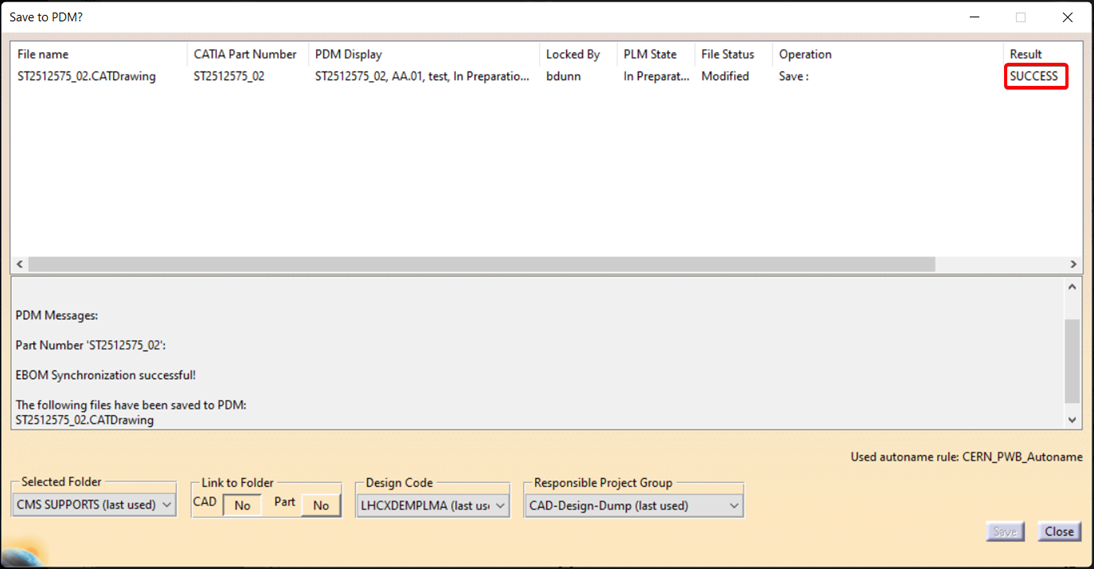
Please be aware that after saving a drawing, there is currently no confirmation response or save icon displayed in the PDM window. This is a known issue and we are actively waiting for a fix to be implemented.
In the meantime, we kindly ask you to check the result column or verify directly in the PLM system that your drawing has been successfully saved.
The main new features of this release are:
CATIA Connector version 17.1.19
- Fixed a saving problem when there is no feedback or error message when an assembly with broken links is not successfully saved.
- Added feedback when an assembly is not saved due to the presence of a .wrl file.
- Resolved an issue allowing users to save multiple CGRs within the same product in subsequent steps, ensuring that native files for all CGRs are correctly uploaded to the PLM.
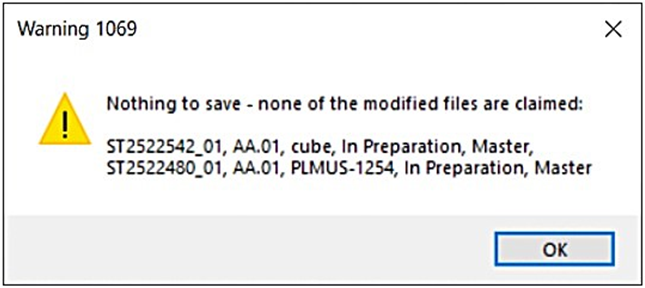
- Updated the CATIA "Warning 1069" message shown, when saving a CAD Structure with modified but unclaimed (non-editable) files, preventing unintended data loss and ensuring users receive clear guidance.
This new PLM feature enables users to share data from Design Collections with external collaborators through temporary, shareable links.
These links allow external users to securely download data without requiring CERN authentication, while ensuring full traceability of link creation and downloads.
The following conditions apply to documents shared via Public Link.
- The Public Link must be created from an Approved Design Collection with related Part in Approved or Released state.
- Draft or non-approved documents are not eligible for external sharing.
- Only documents attached to that Design Collection can be shared.
- Documents are automatically compiled into a ZIP file at the time the link is accessed.
Access Restrictions:
- No CERN authentication is required for external users.
- The link provides download-only access.
- Access is restricted solely to the generated link.
- Documents are only accessible until the defined expiration date. Once expired, the link becomes inactive and documents are no longer accessible.